Showing posts with label Iphone Firmwares. Show all posts

iOS 5 IPSW Firmware - iPhone 4, 3GS, iPad 2, 1, iPod Touch 4G, 3G [Download - Direct Links]

iOS 5 IPSW Firmware - iPhone 4, 3GS, iPad 2, 1, iPod Touch 4G, 3G-Download iOS 5 ipsw firmware (final version) is available finally. Apple has released the very final version of iOS 5 for all iDevices. As most of you know that iOS 5 coming with more than 200 new features such as, the awesome new Notification Center, iMessage, Newsstand, Reminders, Twitter integration, improved Camera app, Photos editing and more.


Before Download iOS 5 ipsw firmware - Here's the supported devices

  • iPhone 4S (shipped with iOS 5)
  • iPhone 4
  • iPhone 3GS
  • iPod Touch 4G
  • iPod Touch 3G
  • iPad 2
  • iPad 1

Before Download iOS 5 Final version - Here's the history of iOS 5 :


Apple has released 7 beta versions and 1 GM version of iOS 5 that unveiled most of the new features of the revolutionary iOS 5 firmware.

Download iOS 5 ipsw firmware [Direct Links - Official from Apple]:

Apple Releases iTunes 10.5 Beta 8 For Developers

Yesterday, Apple has seeded iTunes 10.5 Beta 8 to developers with support to iTunes Match.
itunes-10-5-beta-8110909192806 (1) 


Change Log:
    • Songs in unsupported formats will not be uploaded to iCloud at this time.
    • The scan & match feature is not yet complete.
    • Some songs may not match (even if they is available in the iTunes Store) and will be uploaded to iCloud.
    • Other songs may match to a different version of the same song on the iTunes Store.
    • You can only add music to iCloud from more than one computer at a time.
    • After updating to iOS 5 beta 7, your music may fail to play.  If this happens, turn of
    • Songs in unsupported formats will not be uploaded to iCloud at this time.
    • The scan & match feature is not yet complete.
    • Some songs may not match (even if they is available in the iTunes Store) and will be uploaded to iCloud.
    • Other songs may match to a different version of the same song on the iTunes Store.
    • You can only add music to iCloud from more than one computer at a time.
    • After updating to iOS 5 beta 7, your music may fail to play.  If this happens, turn off iTunes Match in Settings > Music, and turn it back on.
Download iTunes 10.5 Beta 8 For Mac From HERE [Direct Link]

[via]

Install And Jailbreak iOS 5 Beta 7 With Out A Developer Account [Tutorial]

Recently, Apple has released iOS 5 Beta 7 For Developers. Then iH8sn0w Released his latest versoin of Sn0wbreeze 2.8b7 allowing us to remove the UDID check. Check how to install iOS 5 Beta 7 with out a developer account and jailbreak your iDevice on it after the jump.
iOS-51
Our friends at CydiaHelp had made This guide and tried the method on a non-developer iPhone 4 and it worked.
Supported Devices:
  • iPhone 3GS (New bootroom)

  • iPhone 4 (GSM/CDMA)

  • iPad 1

  • iPod touch 3G/4G

How to Install, Activate and Jailbreak iOS 5 Beta 7:
STEP 1: Download iOS 5 beta 7 firmware .DMG file for your iOS device and iTunes 10.5 beta 7 from the links found here.
STEP 2: Use TransMac to convert / change .DMG file to .IPSW using the video guide here.
STEP 3: Now download Sn0wbreeze 2.8b7 from here.
STEP 4: Open Sn0wbreeze 2.8b7 then hit Browse point and point it to the extracted .IPSW iOS 5 beta 7 file you got from Step 2.

STEP 5: If everything goes okay, you’ll get your device identified as below:

STEP 6: Now click on Expert Mode then Build IPSW.

STEP 7: After building your custom IPSW file of iOS 5 beta 7, you’ll have to get your device in DFU mode. Just follow the on-screen instructions to PWN DFU mode your device.

STEP 8: After getting the black screen on your iOS device, head to the installed iTunes 10.5 beta 7 from Step 1 and open it up.
STEP 9: Before restoring your device, make a backup for your settings, contacts, photos and etc. by right clicking on your iPhone’s icon and hit Backup.

STEP 10: Now, while holding the Shift key, click on Restore and point it to the Sn0wbreeze custom IPSW you’ve already made.

STEP 11: Wait few minutes and you’ll finally get your iPhone, iPad or iPod touch with iOS 5 beta 7.
STEP 12: After done with iOS 5, you’ll need to backup your iOS things. Just open iTunes and restore from your old Backup.

Notes:
- In case you got Error 10, then you’re not using iTunes 10.5 beta 7.
- In case you got other Errors, then you didn’t put your device in DFU mode. Just use iREB (download here) to put your device in PWN DFU mode.

- iOS 5 beta 7 is tethered only jailbroken, so you’ll have to use iBooty (Sn0wbreeze 2.8b7 downloads it in the same directory of your custom IPSW) everytime your iPhone is rebooted to get Cydia installed again.
You are done, Enjoy you jailbroken device.
Via | CydiaHelp

Redsn0w 0.9.8b7 Can Jailbreak iOS 5 Beta 7

Yesterday, Apple has seeded iOS 5 Beta 7 for developers. Many would now be looking for a jailbreak for the new update. Well MuscleNerd has announced on his twitter account that the just released Redsn0w 09.8b7 can jailbreak iOS 5 Beta 7.
Jailbreak-iOS-5-Beta-7
Of course you will have to point Redsn0w to iOS 5 Beta 6 IPSW firmware not the new one.
Here is our tutorial on how to use Redsn0w To Jailbreak iOS 5 Beta 1 and you can follow the same steps for Beta 7.
Download Redsn0w 0.9.8b7 For Windows / Mac

[via]

iOS 5 Beta 7 Is Set To Expire on October 20

Yesterday, Apple has released iOS 5 Beta 7 For Developers. The update brings some bug fixes and new improvements. iH8sn0w has announced that the new beta will expire on October 20.
iOS-5-Beta-7-Expire
iOS 5 Beta 1,2,3 and 4 are all expired now. The Beta 7 is set to expire on October 20. This is a surprise as The public version of  iOS 5 is expected to be launched early October along side the iPhone 5. iOS 5 GM is expected around September 30th as a new version should be released much before October 20.


[via]

iOS 5 Beta 7 Seeded To Developers [ What’s New ?]

Yesterday, Apple has seeded iOS 5 Beta 7 To Developers for iPhone 3GS/4, iPod touch 3G/4G, iPad 1/2. The update is available via OTA (Over The Air update service) and on the dev center.
ios 5 beta 7 01
People Over BGR have made a full change log for the new update. Here is it:
Accounts
  • When creating an iCloud account, you can use any Apple ID as long as it is a full email address and not a MobileMe account. If you have a MobileMe account, you can move that account to iCloud. You can find more information on iCloud at: http://developer.apple.com/icloud


AirPlay
  • Starting in iOS 5, video content in applications and websites are AirPlay-enabled by default.

  • iOS 5 supports AirPlay of video via AV Foundation.


API Validation
  • NEW: Starting in iOS 5.0 development tools beta 7, it is possible to extract APIs used by an application and have them checked for private APIs usage. This option will be offered at Validation time.


Apple TV
  • Apple TV Software beta enables users to mirror the contents of an iPad 2 to an Apple TV (2nd generation) using AirPlay. This beta software also enables Photo Stream on Apple TV so users can access photos stored in iCloud. Apple TV Software beta is being provided to test the latest AirPlay functionality with your iOS 5 apps and web sites. If you wish to install Apple TV Software beta on your device, you must first register your device UDID in the iOS Developer Program Portal.

  • Slideshow settings are not remembered for slideshow playback (always plays back in Reflections theme). Screen savers settings are behaving properly.


Binary Compatibility
  • On applications linked against the iOS 5.0 SDK, scroll view content offsets will no longer be rounded to integral pixels during a pinch gesture.


Calendar
  • Birthday calendars are not currently available via the icloud.com website or in Windows. They will be available in a future release.


Core Image

iBooks
  • iBooks 1.2.2 may fail to display some text or images in books. Please update to iBooks 1.3 in the App Store.


iCloud Backup
  • If you enable iCloud Backup, automatic backup with iTunes when syncing will be disabled. We also suggest that you manually back up your device with iTunes. Backups made with earlier versions of iOS 5 beta will soon become incompatible, and will no longer be available. It is strongly advised you upgrade to this version of the iOS 5 beta in order to continue backing up your devices.


iCloud Storage
  • NEW: Starting in iOS 5 beta 7, the requirements for specifying container identifier strings in your application’s entitlements have changed. Each container identifier that does not include a wildcard character must exactly match the bundle identifier of an application published using the same team ID as your application. You are not required to include an entitlement that matches your app’s own bundle identifier; for example, a lite and pro version of your app could both specify the pro app’s bundle identifier to share the same container. The requirements for container identifiers that include wildcard characters have not changed, but you may need to update existing wildcard identifiers after changing any non-wildcard identifiers in your application’s entitlements to match the new rules.

  • NEW: In this beta of iOS 5.0 the number of times an app can synchronize in quick succession with the servers has been reduced. If you are debugging your app and want to see whether your synchronize requests are being throttled, you can call the -[NSUbiquitousKeyValueStore _printDebugDescription] method directly in gdb. Please note that -[NSUbiquitousKeyValueStore _printDebugDescription] is an SPI so you are strongly advised not to use it in your app.

  • On KVS, the per-key limit has been raised to 64Kb (to match the per-app limit); and the maximum number of keys has been raised to 256.

  • During the iOS 5 beta period, any documents stored on the servers might be purged periodically before GM. Therefore, it is highly recommended that you do not store any critical documents or information on the servers.

  • Provisioning Profiles no longer need to be enabled for iCloud in the iOS Provisioning Portal. All newly generated provisioning profiles are now automatically enabled for iCloud. If you are using an Xcode managed Team Provisioning Profile, click refresh in the Xcode Organizer to obtain a new iCloud-enabled profile. To enable all other provisioning profiles for iCloud, simply regenerate your profiles in the iOS Provisioning Portal.

  • If your application is using the NSMetadataQuery class, you must set a predicate, the predicate is now honored. But the predicate is an NSPredicate-style predicate, not a Spotlight-style predicate an example of this is that you must use LIKE instead of = for wild card matching. The differences are defined in more detail at:http://developer.apple.com/library/mac/#documentation/Cocoa/Conceptual/Predicates/Articles/pSpotlightComparison.html#//apple_ref/doc/uid/TP40002370-SW1

  • In this beta, the setSortDescriptors: method of NSMetadataQuery is not supported.

  • To use iCloud prior to beta 5, you had to manually specify various container identifiers (your application’s Display set) within an Entitlements file for both of your Mac OS X and iOS projects.Starting in beta 5, to enable iCloud storage within your apps, simply click the “Enable Entitlements” checkbox in the Summary pane of your project. Xcode will create a custom entitlements file for your project that automatically includes your Team ID. You can add additional iCloud Container values as required by your application. (Note that you must regenerate your existing provisioning profiles, either with Xcode or in the iOS Provisioning Portal, to use iCloud storage.)If you specify a custom identifier string for your iCloud Key-Value Store or iCloud Container entitlement values, you no longer need to prepend your Team ID to the beginning of the string. Xcode will prepend your Team ID to these entries automatically

  • The container identifier string you pass to the URLForUbiquityContainerIdentifier: method of NSFileManagerMUST include the team ID at the beginning of the string. As a convenience, if you passnil, Foundation uses the first document container ID specified in your app’s entitlements.

  • There are issues using the Cloud Storage document API in conjunction with protected data which can lead to data corruption.

  • In this beta, file presenters (objects that adopt the NSFilePresenter protocol) do not receive some of the messages that they’re supposed to receive, especially: You can workaround this by implementing the relinquishPresentedItemToWriter: method and checking to see if the writer actually wrote when your file presenter reacquires.
    File presenters do receive presentedItemDidChange: messages in this beta.

  • While reporting a bug related to the iCloud storage interfaces, please include the logs collected during your debugging session. To generate these logs, you must install a special debug profile on your device.The debug profile can be obtained from http://connect.apple.com. This profile enables the generation of debug logs that are needed to diagnose any problems using iCloud storage. The instructions to collect the logs are:
    1. Install the profile. (The easiest way to do this is to mail it to yourself and open the attachment on their device.)

    2. Reproduce the bug.

    3. Sync with iTunes to pull the logs off your device.

    4. Attach the logs to your bug report. You can find the logs in ~/Library/Logs/CrashReporter/MobileDevice/DeviceName/DiagnosticLogs.

    These logs can grow large very quickly, so you should remove the profile after you have reproduced the problem and pulled the logs for the bug report.

  • File names are case-insensitive in OS X but case-sensitive in iOS. This can lead to problems when syncing files between the two. You should take steps on iOS to avoid creating files whose names differ only by case.


Find My iPhone
  • After OTA update Find My iPhone does not work. To make it functional you can toggle the the Find My iPhone from OFF to ON in Settings.


GameKit
  • NEW: Auto-matching with the Turn-based view controller does not work. Invites or the direct auto-match API can be used as a workaround.

  • Match data for turn based matches is currently limited to 4 KB of data.

  • FIXED: Events will be passed to the delegate whenever a turn is made on a match, instead of just when it becomes the local player’s turn.


iMessage
  • iMessage beta 1 will be unable to communicate with iMessage users on beta 2 or later.

  • FIXED:Setup Assistant does not provide AppleID password as an input for the FaceTime in iMessage.


interface Builder
  • FIXED: When editing the value of a constraint in the inspector, the constraint remains selected, and the outline view continues to show the constraint as selected.

  • In XCode 4.2 when copying views (either a single view or multiple views), both the user defined constraints directly on the selected view and the user defined constraints between the views being copied are copied to the pasteboard.

  • Changing the segment style of an NSSegmentedControl object to “Automatic” might crash in documents using Cocoa Auto Layout. To workaround the issue use an explicit segment style such as Round or Textured, and at runtime, change the segment style to automatic using the setSegmentStyle: method.


iTunes
  • NEW: When trying to restore an iPhone 3GS or iPod touch 3rd generation device running Beta 6 to Beta 7 using iTunes, you will have to set the device into DFU or you can OTA update to Beta 7. To enter DFU mode you will have to:
    1. Connect the device to USB on your Mac.

    2. Turn the device off.

    3. Launch iTunes on your Mac.

    4. Hold down the Home and Power buttons for 10 seconds.

    5. Continue holding the Home button but let go of the Power button.

    6. Hold Home button for 13 seconds or until the device shows up in iTunes.


  • The version of iTunes that comes with beta 7 cannot sync devices that have the beta 6 software installed. To avoid this problem, do the following:
    1. Sync any devices that have beta 6 installed to the version of iTunes that came with beta 6.

    2. Upgrade iTunes to the version that comes with beta 7.

    3. Connect the device and install the beta 7 software. (Understand that you might see a failure to sync error when you first connect the device.)

    4. After installing the beta 7 software, restore from your the backup you made in step 1.


Mail
  • When changing the host name of an email account in settings, blank messages may be seen in the unified inbox. As a workaround, delete and re-add the account instead of changing its host name.


Music Player
  • When deleting a song or video from Music/Videos on the device it crashes the app.


OpenGLES
  • FIXED: After the lighting stage, whether lighting is enabled or not, the resulting color values are not clamped in GLKit/GLKEffects with either GLKLightingTypePerVertex or GLKLightingTypePerPixel set on the effect. As a result it is not uncommon to see differences in lighting between the two, especially when multiple lights are enabled. This differs from OpenGLES 1.1 which clamps color values after the lighting stage regardless of whether or not lighting is enabled.


OTA Software Update
  • Users who installed iOS 5 beta 6 over the air from iOS 5 beta 3 must first erase all content and settings by choosing Settings > General > Reset > Erase All Content and Settings in order to install iOS 5 beta 7 over the air. This only impacts users who did not update to iOS 5 beta 4.

  • If you are doing an OTA software update, you will need to re-sync your photos with iTunes.”

  • FIXED: There may be some cases where purchases from the App Store or iTunes Store appear to be stalled because the device is downloading something else in the background. A workaround is to disconnect the device from power (unplug the device).

  • NEW: If you have a passcode set, it must be removed before updating to seed 7 from previous seeds. It can be re-enabled after the update is complete. Failure to do so may require iMessage to be re-enabled in settings.


Reminders
  • FIXED: If reminders syncing is enabled for a Yahoo account and there is no reminders collection on the server, it will continually get recreated by the phone. Due to a Yahoo server bug, that collection will show up as an event calendar.


Security
  • In iOS 5.0 signing of certificates with MD5 signatures is not supported. Please ensure that certificates use signature algorithms based on SHA1 or SHA2.


Simulator
  • Location services are not functional in iOS 4.3 simulator running on Mac OS 10.7 with Xcode 4.2.


Springboard
  • Push and local notifications for apps appear in the new Notification Center in iOS 5. Notification Center displays notifications that are considered “unread.” In order to accommodate push and local notifications that have no “unread” status, developers can use their application badge count to trigger a clearing of notifications from Notification Center. When an application clears its badge count (by setting it to zero), iOS 5 will clear its notifications from Notification Center.


UI Automation
  • There is a known issue when using the performTaskOnHost API in a UI Automation script. If the task being performed with the API outputs excessively (say, thousands of lines of text) to standard out or standard error, the task may deadlock until the timeout is reached, at which point it will throw a javascript exception.

  • The lock() and unlock() functions of UIATarget have been replaced with the lockForDuration() function.

  • Starting in iOS 5 beta 2, you can now trigger the execution of an UI Automation script on an iOS device from the host terminal by using the instruments tool. The command is:
    • instruments -w -t


  • When using the cli instruments for UI Automation you can now target the default Automation Template and pass the script and results path into the tool as environment variable options. For example:
    • instruments -w -t /Developer/Platforms/iPhoneOS.platform/Developer/Library/Instruments/PlugIns/AutomationInstrument.bundle/Contents/Resources/Automation.tracetemplate -e UIASCRIPT


iH8Sn0w Released-Sn0wbreeze v2.8 [BETA 6] for iOS 5 beta 6

Sn0wbreeze v2.8 [BETA 6]


CHANGES:

* Now jailbreaks iOS 5 beta 6.
* Still removes UDID Developer check + Beta timer.
* Still has the ability to hacktivate.
* Still preserves the baseband (as always!).
---------------------------------
Supported Devices and Tethered?
---------------------------------
* iPhone 3GS (old bootrom).....NO
* iPhone 3GS (new bootrom)....YES
* iPhone 4 (GSM)..............YES
* iPhone 4 (CDMA).............YES
* iPod Touch 3G...............YES
* iPod Touch 4................YES
* iPad 1G.....................YES


Download Here


Download IOS 5 Beta 6

Apple Releases iOS 5 Beta 6 to Developers

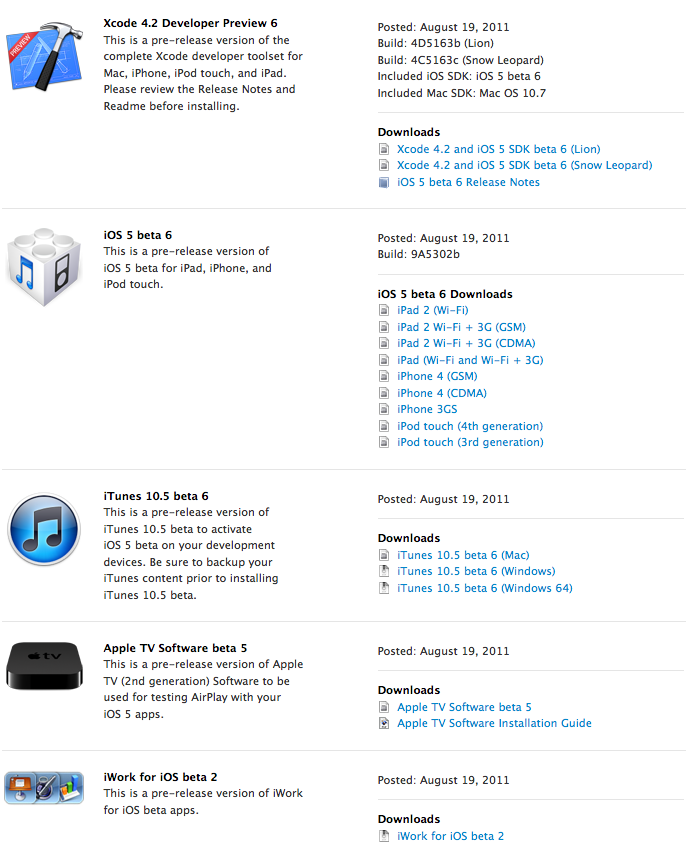
Apple Releases iOS 5 Beta 6+[MU]Download Links


If you’re currently using one of iOS 5 Betas, then here’s a quick heads up: iOS 5 Beta 6 has been released moments ago. If you’re a registered Apple developer, you can legally download it immediately.


iOS 5 beta 6 can be installed using over the air software update from devices that have iOS 5 beta 4 or later installed. Over the air software update can be initiated by choosing General > Software Update in Settings.


Direct Download Links of ios5b6+iTunes


Here are some download links via MultiUpload. Happy downloading!!!

Download via MultiUpload
iOS 5 Beta 6
AppleTV 2G : IPSW, DMG
iPad 1G : IPSW, DMG
iPad 2 (WiFi) : IPSW, DMG
iPad 2 (GSM) : IPSW, DMG
iPad 2 (CDMA) : IPSW, DMG
iPhone 3GS : IPSW, DMG
iPhone 4 (GSM) : IPSW, DMG
iPhone 4 (CDMA) : IPSW, DMG
iPod Touch 3rd : IPSW, DMG
iPod Touch 4th : IPSW, DMG

iTunes 10.5 Beta 6
Windows 32-bit : Zip
Windows 64-bit : Zip
Mac : DMG


Alternate Link


iMZDL: iOS 5 & Mac OS X 10.7

Here is iOS 5 beta 6 Features :
Quote:


Accounts

When creating an iCloud account, you can use any Apple ID as long as it is a full email address and not a MobileMe account. If you have a MobileMe account, you can move that account to iCloud. You can find more information on iCloud at: http://developer.apple.com/icloud
FIXED: When setting up an iCloud or MobileMe account using the setup assistant and leaving Find My iPhone on, it might actually turn Find my iPhone off after the setup. Please verify in Settings/Mail, Contacts, Calendar/YourAccount that Find my iPhone is toggled On after leaving the setup assistant.
FIXED: Enabling iCloud services in Setup Assistant may not always be saved correctly. After completing Setup Assistant you should visit Settings > iCloud to verify the state of the iCloud account. If you have multiple iCloud or MobileMe accounts configured on the device you should also visit each of those accounts in Settings > Mail, Contacts, Calendar to verify each account.
FIXED: It is recommended that you disable Bookmarks on multiple accounts. If they are enabled, the results might be undefined.
AirPlay

Starting in iOS 5, video content in applications and websites are AirPlay-enabled by default.
iOS 5 supports AirPlay of video via AV Foundation.
Calendar

Birthday calendars are not currently available via the icloud.com website or in Windows. They will be available in a future release.
FIXED: The default calendar is still the On My iPhone calendar despite setting up an iCloud account during Setup Assistant. As a workaround, reset the default Calendar after finishing Setup Assistant in Settings > Mail, Contacts, Calendar > Default Calendar.
FIXED: Pushing iCloud Calendar data is not working in iOS. To sync your iCloud Calendar, launch the Calendar app
or refresh the calendars manually using the Calendars button in the top left corner.
iBooks

iBooks 1.2.2 may fail to display some text or images in books. Please update to iBooks 1.3 in the App Store.
iMessage

iMessage beta 1 will be unable to communicate with iMessage users on beta 2 or later.
NEW:Setup Assistant does not input AppleID password in for FaceTime of iMessage.

interface Builder

NEW:The top-level views in a document that uses autolayout cannot have width and height constraints added. To workaround this you can add desired width or height constraint manually in code.
NEW:In Interface Builder documents using autolayout and constraints that Xcode generates cannot be deleted. You can “delete” these constraints by creating a user constraint for the behavior you are expecting. For example, if you drag out a button and Xcode generates a leading constraint to the button’s superview, and you wanted a trailing edge to the superview constraint, creating one manually using “Add Constraint => Trailing Constraint to Superview” would remove the leading edge to superview constraint.
NEW:It is known that equal widths/heights constraints can be broken on views that fill a container when resizing the window. If you resize the window and a equal widths/height constraint is broken, re-adding it will properly adjust the window to accommodate the constraint.
NEW: When editing the value of a constraint in the inspector, the constraint remains selected, and the outline view continues to show the constraint as selected.
NEW:In XCode 4.2 when copying views (either a single view or multiple views), both the user defined constraints directly on the selected view and the user defined constraints between the views being copied are copied to the pasteboard.
NEW:In Xcode 4.2 for a document using Cocoa Auto Layout, “Select All” in the canvas no longer selects the constraints and subviews of the edited view. If a view is selected, it will only select views. If a constraint is selected, “Select All” will select all constraints.
NEW:Changing the segment style of an NSSegmentedControl to “Automatic” might crash in documents using Cocoa Auto Layout. To workaround the issue use an explicit segment style such as Round or Textured, and at runtime, change the segment style to automatic using -[NSSegmentedCell setSegmentStyle:]
iPod

FIXED: When using the volume buttons on the device, or on headphones, the volume slider in the UI of applications may not update even though the volume level has changed.
Mail

When changing the host name of an email account in settings, blank messages may be seen in the unified inbox. As a workaround, delete and re-add the account instead of changing its host name.
OTA Software Update
If you are doing an OTA software update, you will need to re-sync your photos with iTunes.”
Photos

FIXED: When restoring photo libraries from an iTunes backup, some photos may not appear in the Photos application after restore. Please back up your photos before updating to iOS Beta 5.
Reminders

NEW: If reminders syncing is enabled for a Yahoo account and there is no reminders collection on the server, it will continually get recreated by the phone. Due to a Yahoo server bug, that collection will show up as an event calendar.

Wi-Fi Syncing

In iOS 5 beta 4 and later, wireless syncing is now available on Windows as well as the Mac. (This support requires OS X 10.6.8 or Lion.) You will see an option to enable wireless syncing when you connect your device to iTunes with the USB cable. It is recommended you perform your initial sync with a cable after restoring your device.
Wireless syncing is triggered automatically when the device is connected to power and on the same network as the paired computer. Or, you can manually trigger a sync from iTunes or from Settings > General > iTunes Sync (same network as paired computer required).
If you find issues with apps, media and/or photos synced to your device, you can reset then resync. From Settings > General > Reset, choose Erase all Content and Settings. Then reconnect to iTunes and sync again.
FIXED: In some cases, your device may fail to sync contacts, calendars and account settings, or back up to iTunes. If this happens, reboot your device and re-sync
iOS 5 beta 6 expires on: Thursday September 29, 2011

As expected, Apple has released iOS 5 beta 6 to developers today as the fall launch of the major iOS software upgrade nears.
It will expire on Thursday September 29, 2011


@iH8sn0w

Quote:


iOS 5 beta 6 expires on: Thursday September 29, 2011 @ 8:00:01 PM (Eastern Standard Time)
So what it means for you?

If you activated your UDID and installed the beta, keep in mind that the beta has a timebomb attached to it. On August 4, iOS 5 Beta 1 will stop working (meaning that the build will lock you out of the phone). Remember to sync and maintain regular backups of your stuff (which you should be doing anyway).

But can’t the timebomb be deactivated?!
No. That involves modifying lockdown, which would cause it to return an invalid signature on boot and therefore brick the phone. Since we don’t have an iBoot-level exploit for iOS 5, we can’t break the boot chain.

Will I be able to backup my phone after the build deactivates itself?

I’m not entirely sure, but assume that it doesn’t.

Will it make a difference if I have a Wi-Fi only device and just change the date and time?

Sorry, but that won’t work (from experience).

Will iTunes let me restore 4.3.3 back to my iDevice, and will everything still be there?

Yes! If you have your SHSH backed UP!

Why does Apple timebomb builds?

Because you’re not supposed to be using them for productive uses. They’re meant to help developers port their apps to iOS 5.

iOS 5 Beta 6 Is Released For Developers

Apple has just released iOS 5 Beta 6 to developers. Also Xcode 4.2 Developers preview and iTunes 10.5 Beta 6 have been released.

iOS 5 Beta 6
We will post the change log of iOS 5 Beta 6 as soon as possible.
Developers can get the new releases from HERE

Fix Error 1611 When Downgrading From iOS 4.3.5 To 4.3.3

Many have been complaining from this Error “1611” while downgrading their iPhone 4, 3GS, iPod touch 4G, 3G, iPad firmware from 4.3.5 to 4.3.3. Here is how to Fix this annoying error. Check it after the jump.

error 1611
There is two method in which you can fix the “Error 1611” Try the first method and if you still have the error go with the second one.
The First method is very simple just Reboot your computer and change the USB port.
The video below explains the second method:


Here is How To Downgrade iOS 4.3.5 To 4.3.4, 4.3.3, 4.3.2 Or 4.3.1
Also Here is How to Fix Errors [3194, 1600, 1602, 1013, 1015, 20]

[via]

iOS 5 Beta 6 Will Be Released August 17th

Two days ago, Apple has released iOS 5 Beta 5 loaded with lots of new features. Now people over 9to5mac has cracked the OTA update code and got the release date of the next beta.

ios 5 beta 6
Apple plans to release their next developer seed of iOS 5, Beta 6, on Wednesday, August 17th according to some codes a few developers sent our way. The sources, who provided us with the exact date and time of today’s iOS 5 beta 5 release (which we were skeptical of – because it was a Saturday), warns that because we are still days away from the planned release, the seeding can be delayed due to bugs or other reasons out of our control.

[via]

iOS 5 Beta 5 Released

Apple has just seeded the new beta version of iOS 5 to developers. This comes after Apple suspended developers accounts which their owners was selling access to iOS 5 Beta.

iOS-5-beta-5

NOTES AND KNOWN ISSUES

The following issues relate to using the 5.0 SDK to develop code.
Accounts
  • When creating an iCloud account, you can use any Apple ID as long as it is a full email address and not a MobileMe account. If you have a MobileMe account, you can move that account to iCloud. You can find more information on iCloud at: http://developer.apple.com/icloud
  • When setting up an iCloud or MobileMe account using the setup assistant and leaving Find My iPhone on, it might actually turn Find my iPhone off after the setup. Please verify in Settings/Mail, Contacts, Calendar/YourAccount that Find my iPhone is toggled On after leaving the setup assistant.
  • NEW: Enabling iCloud services in Setup Assistant may not always be saved correctly. After completing Setup Assistant you should visit Settings > iCloud to verify the state of the iCloud account. If you have multiple iCloud or MobileMe accounts configured on the device you should also visit each of those accounts in Settings > Mail, Contacts, Calendar to verify each account.
  • It is recommended that you disable Bookmarks on multiple accounts. If they are enabled, the results might be undefined.
AirPlay
  • Starting in iOS 5, video content in applications and websites are AirPlay-enabled by default.
  • iOS 5 supports AirPlay of video via AV Foundation.
Apple TV
  • Apple TV Software beta enables users to mirror the contents of an iPad 2 to an Apple TV (2nd generation) using AirPlay. This beta software also enables Photo Stream on Apple TV so users can access photos stored in iCloud. Apple TV Software beta is being provided to test the latest AirPlay functionality with your iOS 5 apps and web sites. If you wish to install Apple TV Software beta on your device, you must first register your device UDID in the iOS Developer Program Portal.
Calendar
  • Birthday calendars are not currently available via the icloud.com website or in Windows. They will be available in a future release.
  • NEW: The default calendar is still the On My iPhone calendar despite setting up an iCloud account during Setup Assistant. As a workaround, reset the default Calendar after finishing Setup Assistant in Settings > Mail, Contacts, Calendar > Default Calendar.
  • NEW: Pushing iCloud Calendar data is not working in iOS. To sync your iCloud Calendar, launch the Calendar app or refresh the calendars manually using the Calendars button in the top left corner.
Core Image
  • Several filters have been added since beta 1.
  • Match data for turn based matches is currently limited to 4 KB of data.
  • NEW: When logging in to Game Center, the password may clear and login may not complete. Trying a second time will succeed.
  • NEW: In this beta, GameKit Invites may fail. As a workaround, try restarting the device.
iBooks
  • iBooks 1.2.2 may fail to display some text or images in books. Please update to iBooks 1.3 in the App Store.
iCloud Backup
  • As this is beta software, it is recommended that you do not use the iCloud services to store any critical data or information. If you enable iCloud Backup, automatic backup with iTunes when syncing will be disabled. We also suggest that you manually back up your device with iTunes. Backups made with earlier versions of iOS 5 beta will soon become incompatible, and will no longer be available. It is strongly advised you upgrade to this version of the iOS 5 beta in order to continue backing up your devices. If you encounter errors restoring from a backup, or enabling a backup more than one hour after signing into iCloud, try deleting your iCloud account from Settings and adding it back. If errors persist, please try erasing your device and initiating the restore again.
iCloud Storage
  • During the iOS 5 beta period, any documents stored on the servers might be purged periodically before GM. Therefore, it is highly recommended that you do not store any critical documents or information on the servers.
  • NEW: Provisioning Profiles no longer need to be enabled for iCloud in the iOS Provisioning Portal. All newly generated provisioning profiles are now automatically enabled for iCloud. If you are using an Xcode managed Team Provisioning Profile, click refresh in the Xcode Organizer to obtain a new iCloud-enabled profile. To enable all other provisioning profiles for iCloud, simply regenerate your profiles in the iOS Provisioning Portal.
  • If your application is using the NSMetadataQuery class, you must set a predicate, even though the predicate itself is ignored.
  • In this beta, the setSortDescriptors: method of NSMetadataQuery is not supported.
  • FIXED: To use iCloud prior to beta 5, you had to manually specify various container identifiers (your application’s Display set) within an Entitlements file for both of your Mac OS X and iOS projects.Starting in beta 5, to enable iCloud storage within your apps, simply click the “Enable Entitlements” checkbox in the Summary pane of your project. Xcode will create a custom entitlements file for your project that automatically includes your Team ID. You can add additional iCloud Container values as required by your application. (Note that you must regenerate your existing provisioning profiles, either with Xcode or in the iOS Provisioning Portal, to use iCloud storage.)If you specify a custom identifier string for your iCloud Key-Value Store or iCloud Container entitlement values, you no longer need to prepend your Team ID to the beginning of the string. Xcode will prepend your Team ID to these entries automatically
  • The container identifier string you pass to the URLForUbiquityContainerIdentifier: method of NSFileManager MUST include the team ID at the beginning of the string. As a convenience, if you pass nil, Foundation uses the first document container ID specified in your app’s entitlements.
  • There are issues using the Cloud Storage document API in conjunction with protected data which can lead to data corruption.
  • FIXED: In this beta, document-based applications cannot always detect when files change, move, or are deleted out from underneath them.
  • In this beta, file presenters (objects that adopt the NSFilePresenter protocol) do not receive some of the messages that they’re supposed to receive, especially:
    • presentedItemDidChange
    • presentedSubitemDidAppearAtURL:
    • presentedSubitemDidChangeAtURL:
    You can workaround this by implementing the relinquishPresentedItemToWriter: method and checking to see if the writer actually wrote when your file presenter reacquires. You can also use FSEvents to observe file system changes
  • In this beta, messages about changes to files in a directory are not getting delivered to objects that adopt the NSFilePresenter protocol.
  • While reporting a bug related to the iCloud storage interfaces, please include the logs collected during your debugging session. To generate these logs, you must install a special debug profile on your device.The debug profile can be obtained from http://connect.apple.com. This profile enables the generation of debug logs that are needed to diagnose any problems using iCloud storage. The instructions to collect the logs are:
    1. Install the profile. (The easiest way to do this is to mail it to yourself and open the attachment on their device.)
    2. Reproduce the bug.
    3. Sync with iTunes to pull the logs off your device.
    4. Attach the logs to your bug report. You can find the logs in ~/Library/Logs/CrashReporter/MobileDevice/DeviceName/DiagnosticLogs.
    These logs can grow large very quickly, so you should remove the profile after you have reproduced the problem and pulled the logs for the bug report.
  • NEW: File names are case-insensitive in OS X but case-sensitive in iOS. This can lead to problems when syncing files between the two. You should take steps on iOS to avoid creating files whose names differ only by case.
iMessage
  • iMessage beta 1 will be unable to communicate with iMessage users on beta 2 or later.
iPod
  • NEW: When using the volume buttons on the device, or on headphones, the volume slider in the UI of applications may not update even though the volume level has changed.
iTunes
  • The version of iTunes that comes with beta 5 cannot sync devices that have the beta 4 software installed. To avoid this problem, do the following:
    1. Sync any devices that have beta 4 installed to the version of iTunes that came with beta 4.
    2. Upgrade iTunes to the version that comes with beta 5.
    3. Connect the device and install the beta 5 software. (Understand that you might see a failure to sync error when you first connect the device.)
    4. After installing the beta 5 software, restore from your the backup you made in step 1.
  • Videos purchased from the iTunes Store do not play on a 2nd generation AppleTV over AirPlay with iTunes 10.5.
Location
  • FIXED: The startMonitoringSignificantLocationChanges method of CLLocationManager does not cause applications to be resumed or launched in the background for significant location change updates. However, if a backup from a previous software version (where an application was monitoring significant location changes) is restored to the device, significant location change monitoring will continue to cause that application to be resumed or launched in the background.
Mail
  • FIXED: Forwarding a message with attachments included does not attach the file and the message compose screen does not change from “Loading….”
  • NEW: When changing the host name of an email account in settings, blank messages may be seen in the unified inbox. As a workaround, delete and re-add the account instead of changing its host name.
Music Library
  • FIXED: Some songs are missing their album artwork after changing the device library via syncing.
OpenGL ES
  • FIXED: In iOS 5.0 beta 4, several OpenGL ES extensions have been moved from the APPLE namespace to the EXT namespace, causing some API to be renamed. The altered extensions are EXT_color_buffer_half_float,EXT_occlusion_query_boolean, EXT_separate_shader_objects, EXT_shadow_samplers, EXT_texture_rg, EXT_debug_label, and EXT_debug_marker.
OTA Software Update
  • If you are doing an OTA software update, you will need to re-sync your photos with iTunes.”
Personal HotSpot
  • FIXED: In this beta, iPhone 4 device cannot join personal hotspot even if it is on due to a non functional Wi-Fi tethering on these devices.
Photos
  • FIXED: If you apply red-eye adjustments in iOS, and import your image into the iPhoto seed build, the red-eye adjustments will not appear on that image in iPhoto. As a result, subsequent syncing of your image back to the iOS device from iPhoto will not show the red-eye adjustments.
  • NEW: When restoring photo libraries from an iTunes backup, some photos may not appear in the Photos application after restore. Please back up your photos before updating to iOS Beta 5.
Simulator
  • Location services are not functional in iOS 4.3 simulator running on Mac OS 10.7 with Xcode 4.2.
Springboard
  • Push and local notifications for apps appear in the new Notification Center in iOS 5. Notification Center displays notifications that are considered “unread.” In order to accommodate push and local notifications that have no “unread” status, developers can use their application badge count to trigger a clearing of notifications from Notification Center. When an application clears its badge count (by setting it to zero), iOS 5 will clear its notifications from Notification Center.
  • FIXED: iOS 5.0 terminates VoIP applications that are resumed in the background for incoming network traffic with extreme frequency. Developers are encouraged to make sure all incoming data is read from VoIP sockets to avoid this condition.
  • NEW: The UIPrerenderedIcon key (in the Info.plist file) is not honored in this build.
StoreKit
  • NEW: In-App purchase will not work for developers testing their apps with the iTunes Sandbox.
Twitter
  • FIXED: When tweeting your location from Safari and exiting before the location can be established, the location arrow will stay in the status bar. The arrow can be removed by killing Safari from the task switcher.
UI Automation
  • FIXED: Instruments overwrites the loaded automation script, even if another program is editing it.
  • FIXED: The play and record buttons in the Automation instrument script editor may not work properly after targeting an application that was launched by a trace session and has ended. They may also not work if you target an application that was suspended. If you run into this problem and it persists, you may need to close and reopen the trace document to get back into a functional state.
  • FIXED: When capturing actions into a script using the Automation instrument, interfaces with web views or table cells that contain a high number of off screen elements may take an extremely long time before returning with an expression.
  • The lock() and unlock() functions of UIATarget have been replaced with the lockForDuration() function.
  • Starting in iOS 5 beta 2, you can now trigger the execution of an UI Automation script on an iOS device from the host terminal by using the instruments tool. The command is:
    • instruments -w -t
  • When using the cli instruments for UI Automation you can now target the default Automation Template and pass the script and results path into the tool as environment variable options. For example:
    • instruments -w -t /Developer/Platforms/iPhoneOS.platform/Developer/Library/Instruments/PlugIns/AutomationInstrument.bundle/Contents/Resources/Automation.tracetemplate -e UIASCRIPT

Save Gadgets online on social network: